From AI Conversation to Structured Workout
An AI assistant can produce a perfectly useful workout in a few seconds. The awkward part often begins immediately afterwards.
You have a workout described neatly in a conversation, but your watch still needs it programmed as a structured session. That usually means opening its workout builder and working through fiddly nested menus for every effort, target, recovery and repeat. The model has finished its part, but you're left rebuilding the whole thing one step at a time before you can head out the door.
Agent Access is intended to close that small but irritating gap. It lets a compatible AI agent work with Workout Writer on your Mac, while leaving the important decisions and permissions with you.
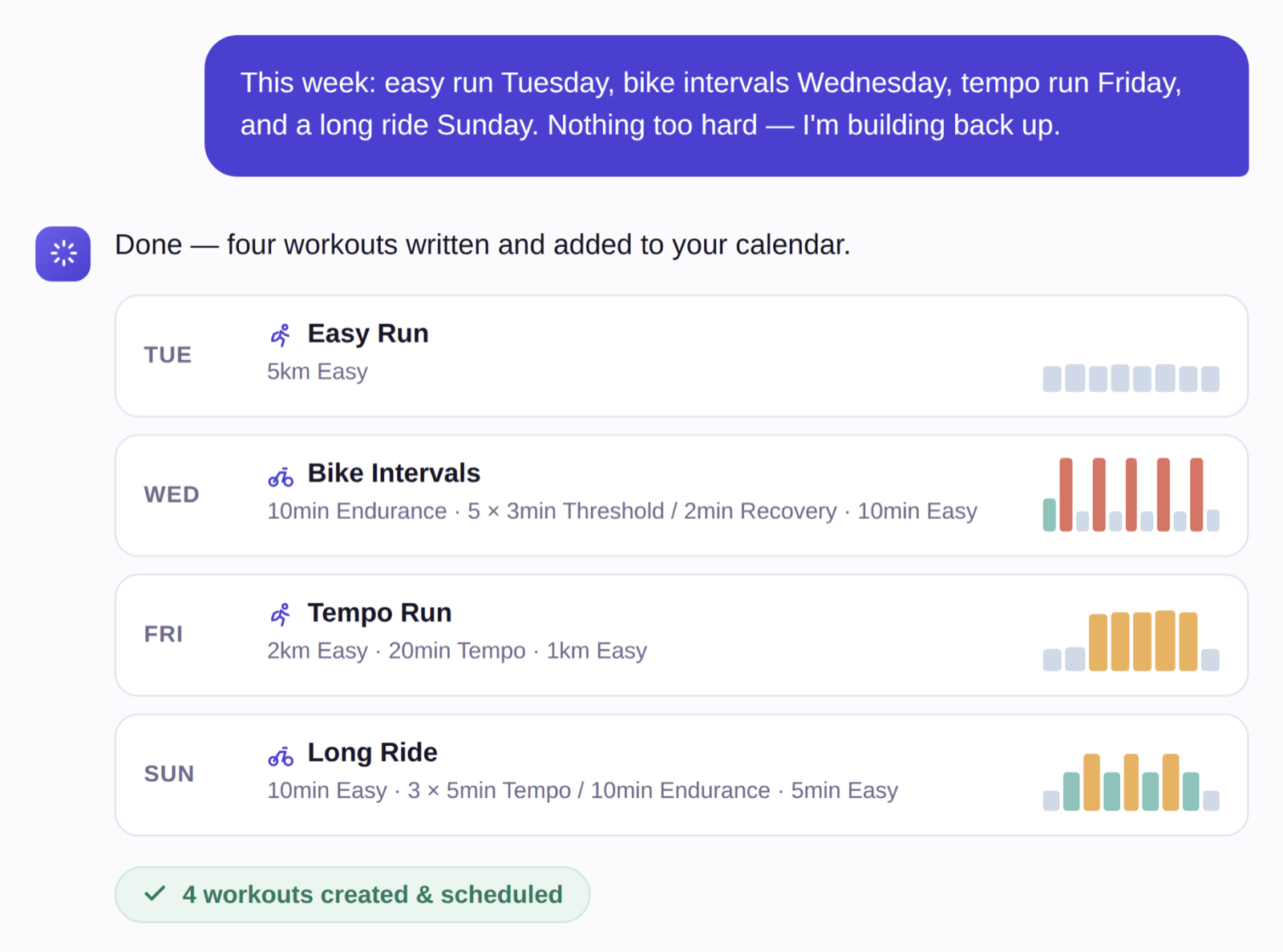
What changes
With Agent Access enabled, an agent can ask Workout Writer which tools are available and use only the ones you have approved. Depending on those permissions, it can:
- read your configured tags and personalised workout-writing guide
- inspect saved workouts and the Workout Writer schedule
- create a structured workout from simple text
- schedule, move or remove workouts your schedule (currently Garmin only).
The interesting part is not that an agent can run a command. It is that the agent can carry useful context from a conversation into Workout Writer without inventing a private route into the app.
Use the tags you already maintain
Suppose your agent has helped you settle on a threshold session. You could ask:
Read my Workout Writer running guide. Draft a controlled threshold interval session of about 45 mins. Show me the workout text before creating anything.
The personalised guide includes the names of the tags you have configured in Workout Writer.
10 min Easy
5 x 4 min Threshold, 1 min Easy
10 min EasyThose short tag names are doing useful work. Workout Writer can apply the pace, heart-rate or power targets already attached to your tags. You do not need to paste your zones into every conversation or make the agent repeat a string of numbers in every step. It also means the workout is reusable in future as your fitness changes.
Check the week before adding to it
Creating the workout is only half the job. It also needs to fit around what is already there.
An agent with read access can inspect a date range in the Workout Writer schedule before proposing a change:
Check my Workout Writer schedule from Monday to Sunday. Tell me which days already have workouts and suggest where this threshold session could fit. Do not create or schedule anything yet.
This is more useful than treating every request as a blank calendar. It can also expose ordinary mistakes, such as adding another hard session beside one that was already scheduled.
Read access does not imply write access. The agent can inspect the week and make a suggestion while the tools for creating or scheduling workouts remain disabled.
When the plan changes
Plans have an unfortunate habit of meeting actual weeks.
If Thursday's workout needs to move, you can ask the agent to inspect the surrounding days first, then propose a new date. Once you approve it, an agent with the appropriate scheduling tool enabled can move the scheduled workout. It can also remove a scheduled instance without deleting the saved workout itself.
That makes small maintenance jobs possible without asking the agent to regenerate the plan:
I cannot train on Thursday. Check Wednesday to Saturday, suggest the least disruptive place for Thursday's workout, and wait for approval before moving it.
The wait for approval is worth keeping. An agent can be very articulate about putting a workout on the wrong day.
Where workout history fits
Workout Writer knows about the workouts you have written and scheduled. It is not a replacement for your completed activity history.
If you want the agent to consider what you actually did, you can provide that context separately. That might be live Strava history through Strava's supported connector, an export from Strava or Garmin Connect, or a smaller training summary you maintain yourself.
The agent can then combine three different kinds of context:
- completed training and recent trends from your chosen activity source
- your current constraints, feedback and goals from the conversation
- your tags, saved workouts and schedule from Workout Writer
That broader workflow needs more care around privacy, missing context and the limits of automated training advice. It is covered in Using AI to Plan Workouts with Strava, Garmin and Workout Writer.
The boundary is deliberate
Agent Access is off by default. Reading tags, inspecting workouts, creating workouts and changing a schedule are separate tools that you can enable individually. You can also require an access key, which the command-line tool keeps in your Mac login Keychain.
The bridge can not read Workout Writer's database or app container directly, it doesn't talk directly to the Garmin API. The app checks every request, rejecting unknown tool calls and anything you have not authorised.
This is not designed to make an agent your silent training-plan administrator. It is a controlled way to let an agent do the repetitive part after you have decided what should happen.
Set it up
Agent Access supports direct command-line use and MCP-compatible clients on Apple silicon Macs. The setup involves installing the Workout Writer CLI, adding the bridge Shortcut, enabling the tools you want and configuring an access key (recommended).
More detail on the available commands and MCP configuration are in the Agent Access guide.